Bijoy Bayanno for Windows
Professional Bangla typing software built around the established Bijoy keyboard layout. Write Bangla for documents, publishing, education and everyday use, switch between Bangla and English, choose Unicode or non-Unicode output, and keep typing offline.
Everything you need to type Bangla on Windows
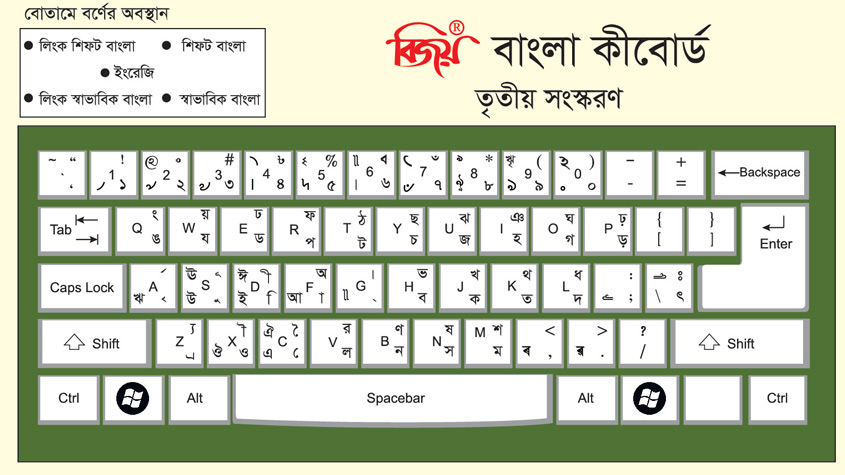
Bijoy Bayanno gives Windows users direct control over Bangla input through a fixed, key-mapped layout - the Bijoy keyboard (বিজয় কিবোর্ড). Letters, vowel signs and conjuncts sit on consistent keys, so accuracy, formatting and speed stay predictable.
Type Bangla directly from the keyboard
Enter Bangla with the familiar Bijoy key arrangement, built for vowels, consonants, vowel signs, conjunct characters and common symbols.
Switch between Bangla and English
Move between Bangla and English input for names, email addresses, technical terms, reference numbers and other mixed-language content.
Work with Unicode text
Unicode suits modern workflows: websites, searchable documents, online forms, email, messaging, databases and content shared across devices.
Use non-Unicode (ANSI) workflows
Non-Unicode output stays vital for established Bangla publishing, printing and archival systems built around traditional encoding and fonts.
Keep typing offline
Once installed, Bijoy Bayanno works without a constant internet connection - practical for offices, exam halls, secure workplaces and low-connectivity computers.
Fast, consistent fixed layout
Every character has a fixed position, so the same input always gives the same result. Trained users type quickly and can use phrase shortcuts for repetitive work.
Built for professional Bangla work
From government offices to newsrooms and classrooms, the Bijoy layout remains the standard for serious Bangla composition.
Offices & administration
Prepare Bangla letters, notices, reports, forms, records and applications with a predictable layout that stays familiar in administrative work.
Publishing & print production
Bijoy grew alongside Bangladesh’s printing industry. Its support for professional composition fits newspapers, magazines, books and educational materials.
Education
Teachers and students can create assignments, lesson materials, examination papers, notes, presentations and academic documents in Bangla.
Data entry
A fixed layout suits repetitive, high-volume input. Trained operators type without phonetic guessing, producing consistent text across large record sets.
Business communication
Create Bangla invoices, product information, customer records, proposals and correspondence, switching to English whenever it is needed.
Personal writing
Write letters, articles, stories, community materials and everyday Bangla on a Windows computer.
It is also ideal for professional typists and data-entry operators, government documentation, students, users working with older non-Unicode files, and anyone moving Bijoy to a new Windows computer.
How Bijoy typing works
The Bijoy keyboard layout for PC assigns every Bangla letter, vowel sign, conjunct and symbol to a fixed key or key combination. Because the mapping never changes, the same keystrokes always produce the same output - the foundation of fast, accurate Bangla typing on Windows.
This is different from phonetic typing. Phonetic tools convert words typed in English letters into Bangla and depend on spelling, pronunciation and prediction. The Bijoy method enters Bangla through defined keys, so the software never has to guess the intended word. The layout is designed around the real shape of Bangla writing, so the full script fits the limits of a standard keyboard.
Why the fixed layout wins for real work
- Consistent keystrokes and predictable output
- Greater control over spelling
- Reliable entry of conjunct characters
- Efficient high-volume typing after training
- Compatibility with established publishing workflows
- A common layout trained users keep across different computers
It rewards practice. If you are learning Bijoy 52, keep a printed or on-screen layout chart visible at first and start with the characters you use most. With repetition the key positions become muscle memory and you can stop relying on the chart.
Unicode or non-Unicode: choose the right mode
Bijoy Bayanno supports both modern Unicode text and traditional non-Unicode (ANSI) text. Selecting the correct mode before you type prevents broken characters, wrong fonts and compatibility problems.
Choose Unicode for
- Websites and online publishing
- Email, messaging and online forms
- Searchable digital documents
- Databases and modern office apps
- Text shared across different devices
- Content intended for search engines
Choose non-Unicode for
- Existing legacy documents
- Traditional desktop-publishing workflows
- Older Bangla font systems
- Print files created with ANSI-based fonts
- Templates built around non-Unicode encoding
- Archives that must keep their original formatting
Encoding is not the same as font. Changing the visible font does not convert text from one system to the other - the input mode, document encoding and selected font must all match the workflow.
Install and start typing
Set up Bijoy Bayanno and write your first Bangla document in a few simple steps.
- 1
Download Bijoy Bayanno
Download the Windows package and save it somewhere easy to find on your computer.
- 2
Prepare the installation file
If the download is a compressed archive (.rar), extract its contents before running the installer.
- 3
Run the installer
Open the setup file and follow the prompts. Windows may ask for approval or to enable a required system component.
- 4
Launch Bijoy Bayanno
Open the application after installation and confirm it is running before you start a document.
- 5
Select the required text mode
Choose Unicode for modern digital content, or non-Unicode for compatible legacy fonts and publishing workflows.
- 6
Switch to Bangla input
Activate Bangla typing and begin entering characters with the Bijoy keyboard layout. Switch back to English when needed.
- 7
Select a compatible font
Use a Unicode Bangla font for Unicode text, or the matching traditional font when working in a non-Unicode environment.
- 8
Test before a long document
Type a short line, save, close and reopen the file to confirm the Bangla displays correctly before important work.
Tips for better results
- Decide on Unicode or non-Unicode before you start - mixing them in one workflow causes display and editing problems.
- A font change is not a text conversion: a font controls appearance, encoding controls how characters are stored.
- Keep a Bijoy keyboard chart visible while you learn, and practise whole words rather than isolated characters.
- Test before a long document: type a line, save, close and reopen to confirm the Bangla displays correctly.
The story of Bijoy
In the 1980s, standard computer systems were not designed to handle the complexity of Bangla writing. Journalist and technology entrepreneur Mustafa Jabbar set out to solve this by developing Bangla fonts, software and a new keyboard arrangement. The first Bijoy Bangla software was released on December 16, 1988, Victory Day in Bangladesh - the name “Bijoy” means “victory.”
The original software was built for Macintosh computers; a Windows version followed in 1993, helping the Bijoy keyboard (বিজয় কিবোর্ড) become part of the country’s printing, publishing and office industries. Ananda Computers has continued developing the system, and what began as a fix for a publishing problem grew into one of the best-known Bangla script-writing systems.
Why the name “Bayanno” matters
“Bayanno” means “52” and refers to 1952 and the Bangla Language Movement. On February 21, 1952, people gave their lives demanding recognition of Bangla as a state language. In 1999, UNESCO recognised February 21 as International Mother Language Day, extending that significance worldwide.
A recognised Bangla keyboard standard
The Bijoy Keyboard Layout (BDS 1738:2018) and Bijoy Coding System (BDS 1935:2018) are nationally recognised standards in Bangladesh, reflecting the layout's established role in professional Bangla typing, documentation and publishing.